Workflows
New organization sign-up
- Sign-up a user
- Create an organization. The API automatically creates and returns a default team for every organization.
- Redirect the user to the just created team
- Create a role based on a role template.
You can add candidates in a single request with the role creation. If you want to add a candidate later, you need to create a ref check.
Candidate invitation handling
When you add a candidate to a role (by role or refcheck creation), the API sends an email notification to the candidate.
The notification contains an auth link with next query param.
An example of the url in the email notification: https://frontend.app/auth/link/{token}/?next=/candidate-dashboard/refchecks/{id}/
The user flow is following:
- After handling the auth link with the
nextparam, the candidate will be redirected to a references management page.
TODO: please, provide a frontend app path of the page to the backend team - Fetch the refcheck with query param
?expand=role(the refcheck id will be passed in the url or selected by the user) and show a list of references that need to be invited (keyrole.references_required).
The request example :https://api.nitrohiredev.xyz/v1/refcheks/{id}/?expand=role - Add references to the refcheck.
HR manager cabinet
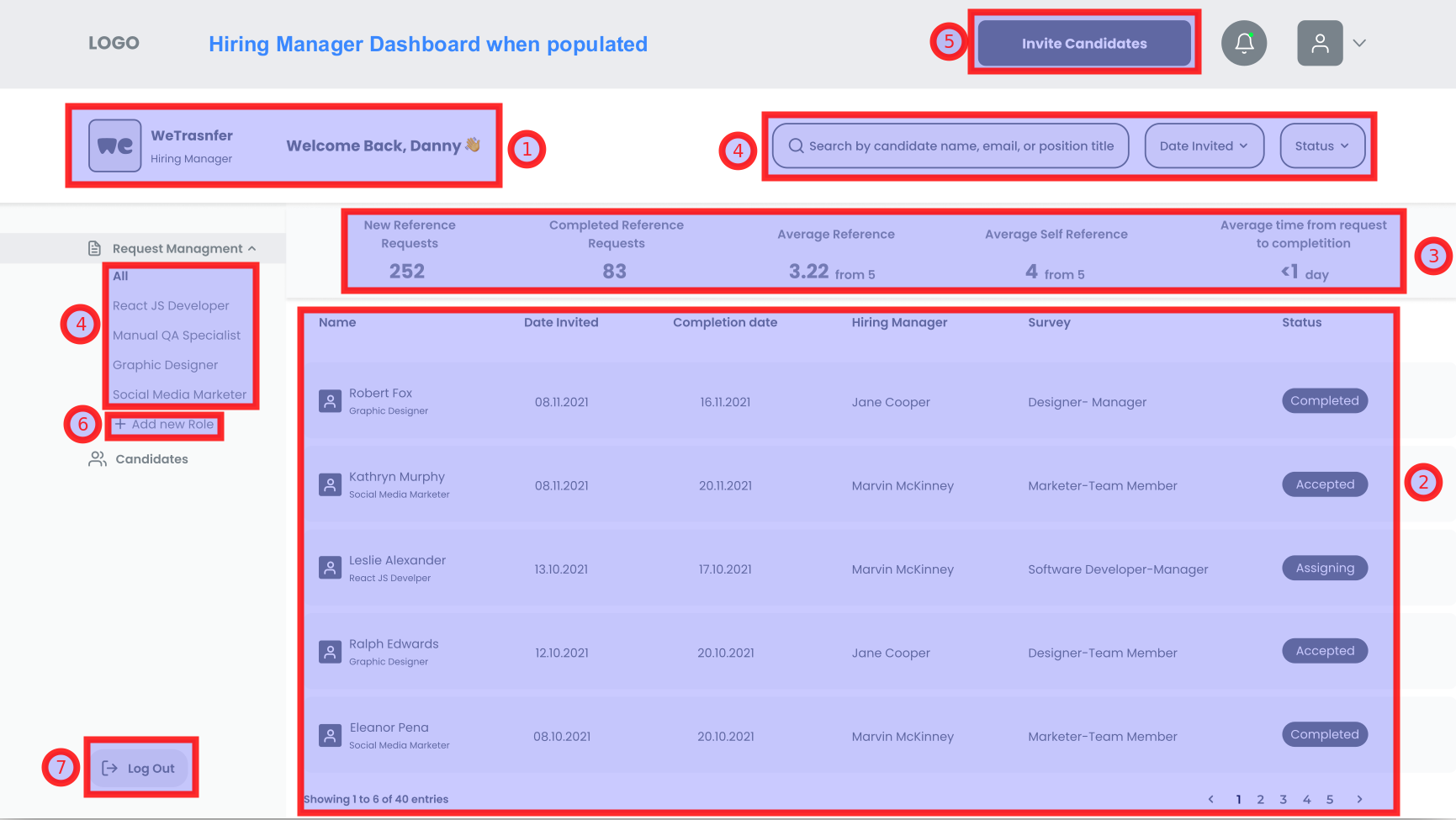
- The user data is returned within successful login response.
- That's a list of refchecks
- That's a refchecks summary // TODO: add refchecks summary endpoint
- You can filter refcehcks and refchecks summary using
search,created_at,status(TODO: handling refcheck status in backend), androlequery parameters. - In order to invite a candidate, create a refcheck
- Create a role
- In order to logout, stop sending
Authorizationheader to the backend
Candidate report
Here is a dedicated page available that describes how to get a candidate/refcheck report.
Edit profile
Here is the current user update endpoint
Manage organization/team members
A team admin and owner can manage team members
Provide feedback about a candidate
- A reference receives an email invitation
- The reference can accept or reject invitation // TODO: add swagger links to the endpoints
- Refer to the questionnaires guide to learn how to work with questions and answers for accepted invitations